
Site records · Field crews · Office review
Construction Health & Safety Software for NZ Civil Teams
Keep operational safety records connected to the work. Fieldlink brings job safety documents and forms together with company safety registers, field submissions and office follow-up.
For supervisors, H&S managers and operations teams who need to find the record, see what needs attention and follow up with the right person.
01 / Health & safety
Start with the job. Keep the wider view.
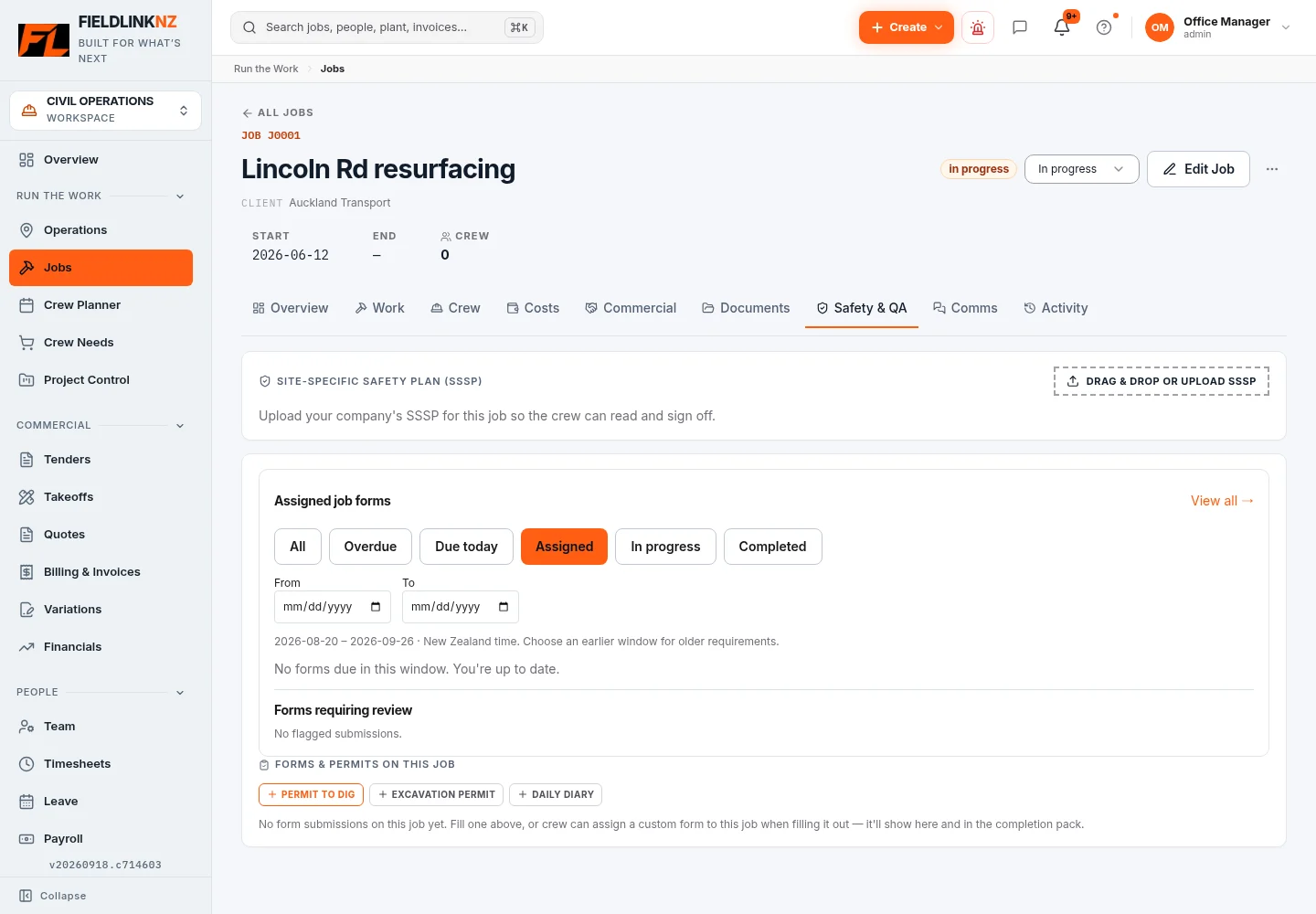
A civil job has a site plan, a changing crew and work that needs to be recorded in the field. The Job Safety & QA tab provides access to uploaded SSSPs, assigned forms and form submissions for that job.
The Health & Safety workspace gives office users a broader view: open safety items, forms awaiting review, toolbox sessions, inspection and QA reviews, corrective actions and upcoming competency or certificate expiries. Individual registers keep their own record types and access rules.
02 / Health & safety
From a site record to office follow-up.
The workflow depends on the record: a plant pre-start belongs to a machine; an assigned site form carries its configured job context; a corrective action belongs to its source safety report.
Prepare the job records
Make the relevant SSSP available and configure the forms the crew needs. Assign forms with the appropriate job, people and schedule.
Record the work in the field
Workers open available records and forms on their phones, enter the requested information and add evidence where the form supports it.
Review what needs attention
Office users open submitted records and flagged form responses. Inspections and QA have their own supervisor and office review stages.
Assign and follow up
Create an assigned corrective action on a safety report, set a due date and follow its completion and office verification.
Example workflow shown for demonstration purposes: a drainage crew reads the job SSSP, completes an assigned site form and reports a hazard. The office reviews the report and assigns follow-up. These are separate records, not an automatic approval chain.
03 / Health & safety
Safety forms that match your site records.
Use the Form Library and builder to digitise your business forms, including site checks, inspections or permit records. Configure required information, conditional questions and supported photo, file or signature evidence.
Assignments identify who needs to complete a form and when, including recurring work. Submissions preserve the form definition used for the record. Flagged responses can be reviewed with a note in the office.
A Permit to Dig or Excavation Permit form records your process. Its submission is not automatic permission to start work; your business still sets the required review and authorisation.
04 / Health & safety
Toolbox topics, attendance and session records.
A supervisor can combine several library topics in one toolbox session or add custom topics for the work ahead. The session holds its selected topic content, job context and site-specific discussion information.
Workers sign attendance on a phone; the delivery workflow also supports sign-on using a shared device. Topic snapshots are frozen once a session starts or receives a signature, so later library edits do not rewrite that session. Completing the talk produces its session PDF.
Attendance records show who signed. They do not establish that every person understood the discussion or that the site is safe.
05 / Health & safety
Report an issue. Keep the follow-up visible.
Field users can record hazards, incidents and near misses, including job context and the information captured by the reporting form. The office can filter and review those reports. A notifiable flag is a user-entered record, not a software decision about reporting obligations.
Corrective actions on safety reports have an assigned person, optional due date and four states: Open, In progress, Completed and Verified. The assignee can add a completion note and evidence; office users verify completed work. My Safety gives workers access to their assigned actions.
Completing an action records the work reported by a person. Verification records the office review; neither state is an independent safety certification.
06 / Health & safety
Keep people and safety documents in context.
Competency records and uploaded certificates can carry expiry dates. The competency register and H&S overview help the office identify records that are expired or due for review. A current record does not itself determine whether someone is competent for a particular task.
Site inductions have their own published content, completion records, knowledge checks and signatures. Company Health & Safety documents are available through the existing document workspace; job SSSP documents stay with their job.
For inspections and QA, field evidence passes through the configured supervisor and office review workflow. Keep those reviews distinct from a toolbox attendance record or plant pre-start.
07 / Health & safety
Useful records, with people responsible for decisions.
Fieldlink organises information and follow-up. Your team decides the controls, suitability of documents, response to defects and whether work can proceed. Use your site requirements and competent advice when setting up forms and reviewing records.
Access depends on the user role, assigned work and company configuration. Do not assume every field user sees the office registers. Plan for an internet connection when submitting and reviewing records; offline capability varies by workflow.
Before you start
Common questions
Does Fieldlink make our site compliant?
No. Fieldlink helps organise site safety information and follow-up. The business and its people remain responsible for their decisions, site controls and obligations.
Are plant pre-starts and site pre-starts the same record?
No. The plant pre-start workflow records checks against a machine. Site briefings or daily site checks can use appropriately configured forms, and a printable site pre-start template is also available in the Civil Hub.
Can we use our own safety forms?
Yes. The form builder supports configurable fields, conditional questions and evidence. Set up the form, its availability and any assignments to match your process, then review submissions as needed.
Where do toolbox talks fit?
Toolbox sessions hold selected topics, attendance and signatures. They complement the SSSP, site forms and follow-up actions; they do not replace those records.
Keep the work connected.
For the full office-to-field workflow, explore Fieldlink job management. Find practical tools and guides in the Civil Hub.
Bring site safety records into the working day.
Explore the job documents, forms and follow-up tools with your team in Fieldlink.