
Office experience
Review jobs, available people, crew groupings, plant bookings and conflicts. Keep shared and individual instructions with the relevant job/day.
Civil operations · Crew Planner
A subdivision crew stays on one job for days. An operator moves to another site. A truck needs to be available when the excavator arrives. Fieldlink Crew Planner brings those people, dates and plant allocations into one view.
Plan the week around the jobs. Review the changes before the crew heads out.
01 / Crew scheduling
Civil work often spans several days and depends on more than one person being free. Drainage, roading and earthworks teams need to coordinate the crew, operator, machine and the instructions for that day.
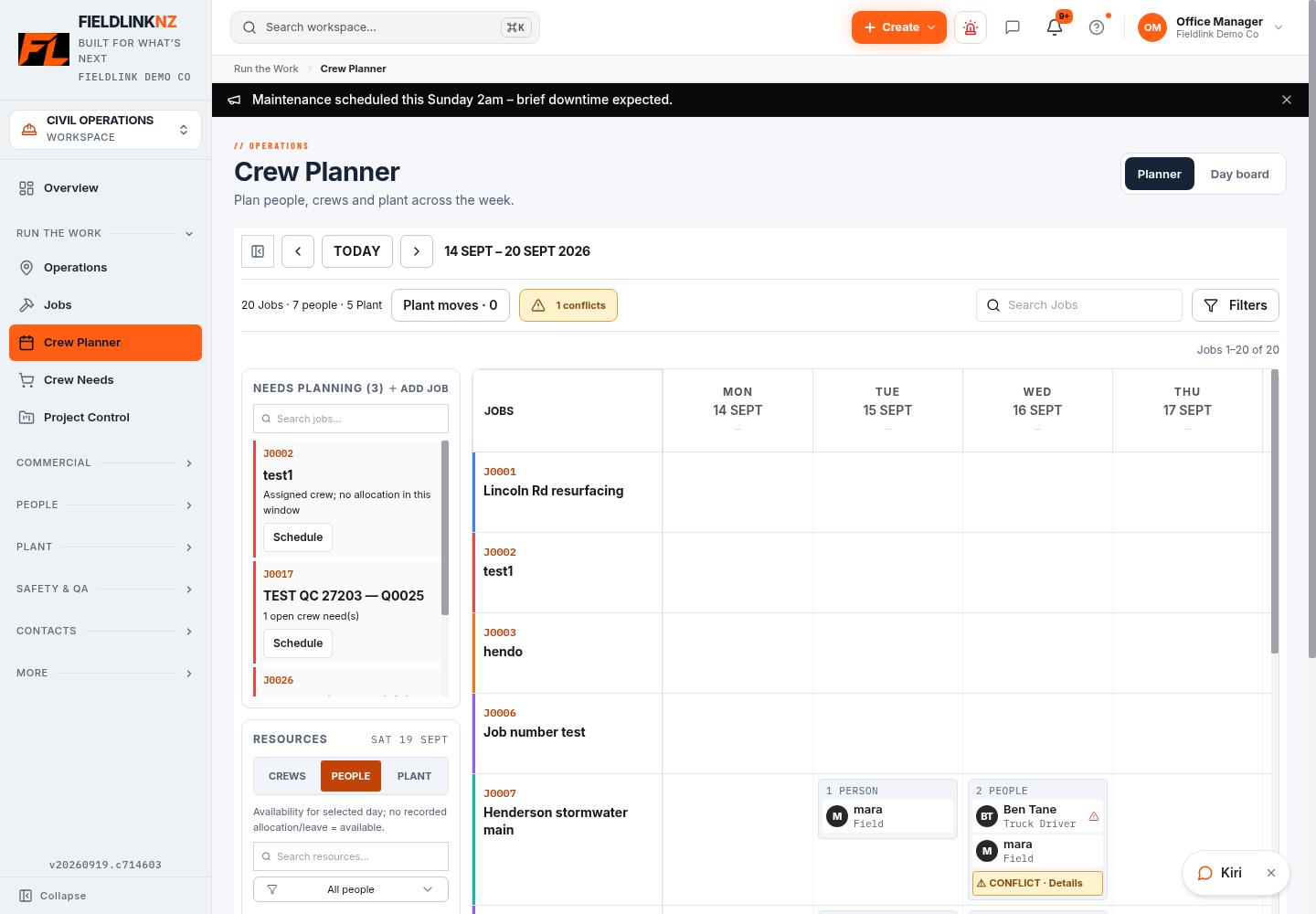
The planner shows jobs against dates, with resource views for crews, people and plant. You can allocate individual workers or use a crew grouping, then review the resulting assignments. A crew grouping is a planning convenience; the workers still have individual allocations.
02 / Crew scheduling
Identify the jobs that need people and the days the work is planned. Keep the address and job details current.
Assign the workers for the selected dates. Crew groups help with regular teams; individual allocations let you change the mix as the work changes.
Allocate plant alongside people and review the visible booking and maintenance information. A planned allocation is not confirmation that a machine has arrived or is ready to operate.
Review overlapping bookings, approved leave and plant warnings. Some conflicts warn the office rather than preventing an allocation; confirm the actual arrangement before relying on the plan.
Use job/day crew instructions for shared information and personal instructions for a particular worker. Review changes when the plan moves.
03 / Crew scheduling
Use the week view for upcoming allocations and the Day board for the current day. Jobs still needing resources should stay visible rather than being buried in a message thread.
For example, if a drainage job is held up, review the affected people and excavator before moving them to another site. Update the assignments and instructions, then confirm any urgent change with the people involved. A saved schedule is not a read receipt.
Review jobs, available people, crew groupings, plant bookings and conflicts. Keep shared and individual instructions with the relevant job/day.
Workers can see their assigned work and instructions through the field app. Access and fresh updates depend on their role, session and connection.
Review booking and maintenance context before moving equipment. Equipment status and the supervisor’s site decision still matter; the planner does not certify a machine as safe.
04 / Crew scheduling
An allocation says who is expected on the job. Timesheets and site entries record what happened. Keep that distinction when reviewing a day that ran longer than planned or changed after work started.
The crew records actual time against the job, while the office reviews hours and costs. This gives the planner a useful connection to commercial control without treating an assigned day as an approved shift.
05 / Crew scheduling
Start with the active jobs, current people and plant records. Check approved leave and decide who owns changes to the schedule. Build one week and compare it with the plan your supervisors already use.
Make daily instructions specific: which job, what work and what needs confirming. Reconcile late changes with the site team, and review actual timesheets separately at the end of the period.
Civil operations managers, foremen and dispatchers coordinating drainage, earthworks, roading or utilities crews across multiple jobs.
If your main need is critical-path programming, tender programme modelling or automated route optimisation, confirm those needs separately. This page describes resource allocation and daily instructions, not those specialist planning functions.
Before you start
Yes. Crews group people for planning, while the underlying assignments belong to individual workers. Review those assignments when the crew mix changes.
Yes. Assign resources against job dates and review them across the planning window. Check conflicts and daily instructions when carrying work into another day.
Approved leave is included in conflict checks. The current workflow can warn and still create an assignment, so the office must resolve the conflict rather than assume the software has blocked it.
Yes. The planner includes plant allocations and booking/maintenance context. Check the actual machine condition and site arrangements before dispatch.
Workers can view their assigned work and instructions in Fieldlink. For urgent changes, confirm directly with the crew rather than treating a saved update as proof it was seen.
No. Planned assignments and recorded timesheets serve different purposes. Workers record actual work and the office reviews those entries for approval.
For the full office-to-field workflow, explore Fieldlink job management. Find practical tools and guides in the Civil Hub.
Bring one crew, its jobs and plant allocations into the planner, then review the plan with the office and site team.