
Job Management Software
for NZ Civil & Construction Teams
Fieldlink connects jobs, crews, timesheets, plant, safety, costs and commercial workflows for New Zealand civil and construction businesses. Keep the job record close to the people planning the work, doing it on site and reviewing it in the office.
What is job management software?
Job management software tracks every job in your business from the first quote to the final invoice, in one place. For a New Zealand civil or trades crew that means: a unique number for every job, a dispatch board showing who's on what today, timesheets logged against the job (and the digger), hazards and SSSPs attached to the site, supplier invoices matched to the job, and a live running total of what the job has cost versus what you quoted.
The alternative — a whiteboard, three spreadsheets, a group chat and a shoebox of PlaceMakers slips — works right up until it doesn't. Jobs get double-handled, hours get lost between the ute and the office, invoices go out late (or never), and nobody knows which jobs actually made money until the accountant tells you six months later.
Good job management software fixes the same three problems for every contractor: nothing falls through the cracks, the office stops re-typing what the field already wrote down, and you can see each job's margin while you can still do something about it.
Running the job
One job. One shared plan.
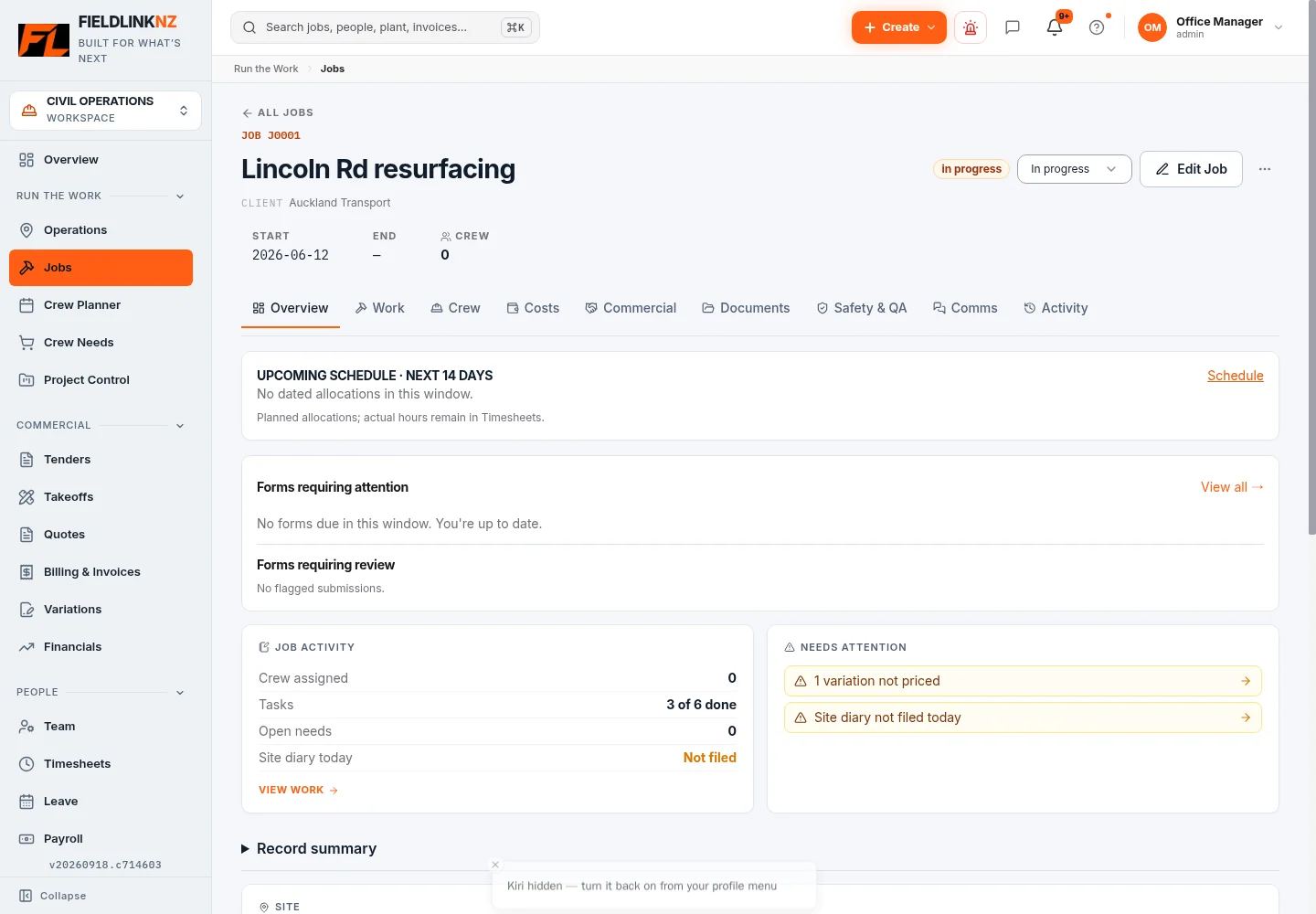
Start with the job record: location, people, documents and the work ahead. Crew Planner assigns people to jobs and dates. Office users can review the plan while the crew checks its work on mobile.
Use crew scheduling to organise the day, then keep tasks and instructions alongside the job. The Operations view helps the office review daily activity across jobs.
Tracking the work
Hours, plant and site records belong with the job.
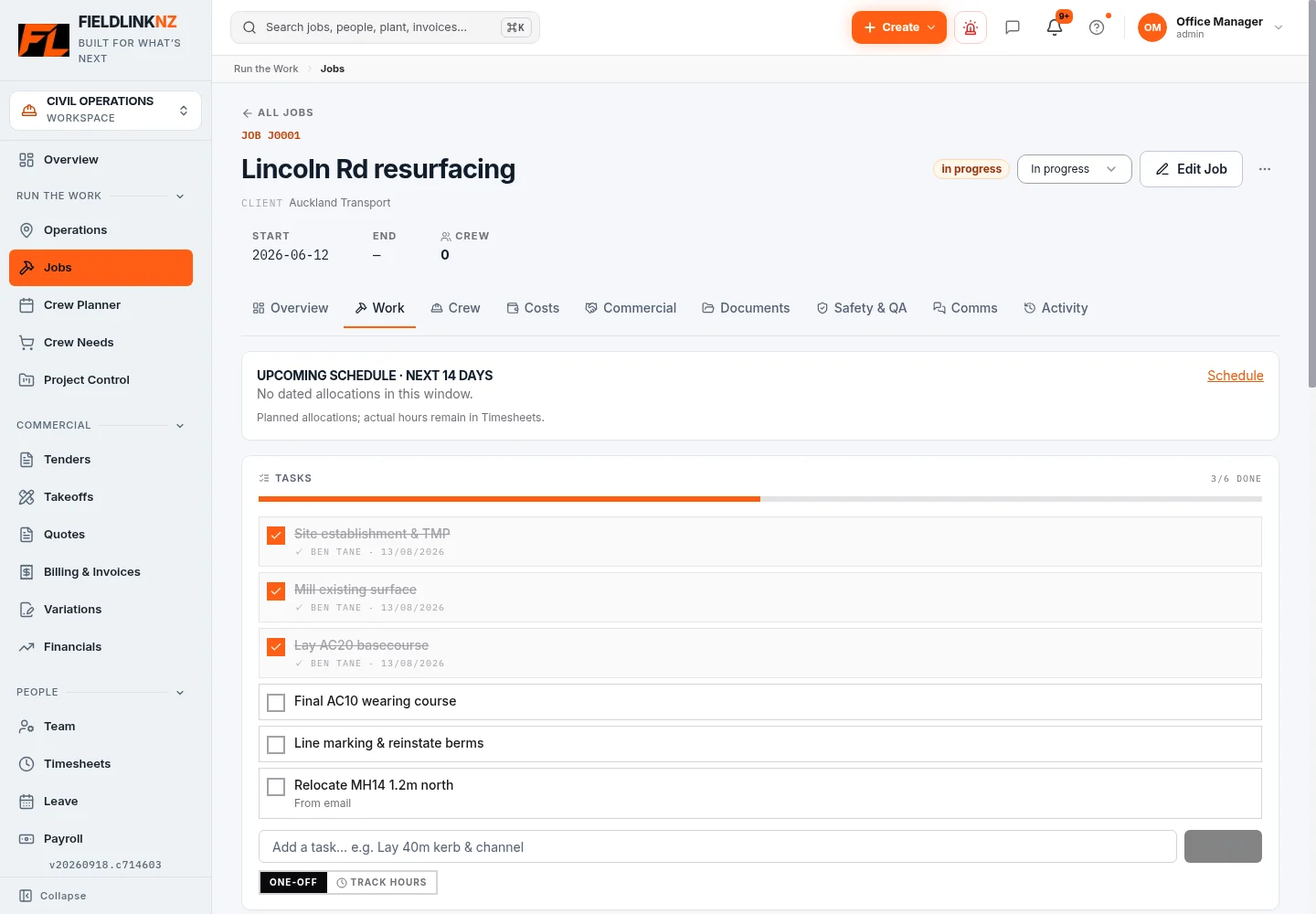
Workers record time against a job. The office reviews and approves the hours before payroll preparation. Explore timesheets for NZ crews.
Record machine use and keep fleet details, service information and pre-start history together. See plant and fleet management.
Keep task updates, photos, QA and form submissions attached to the work. A shared record gives the office somewhere to look when a docket or site detail needs checking.
Health & safety
Keep safety information within reach.
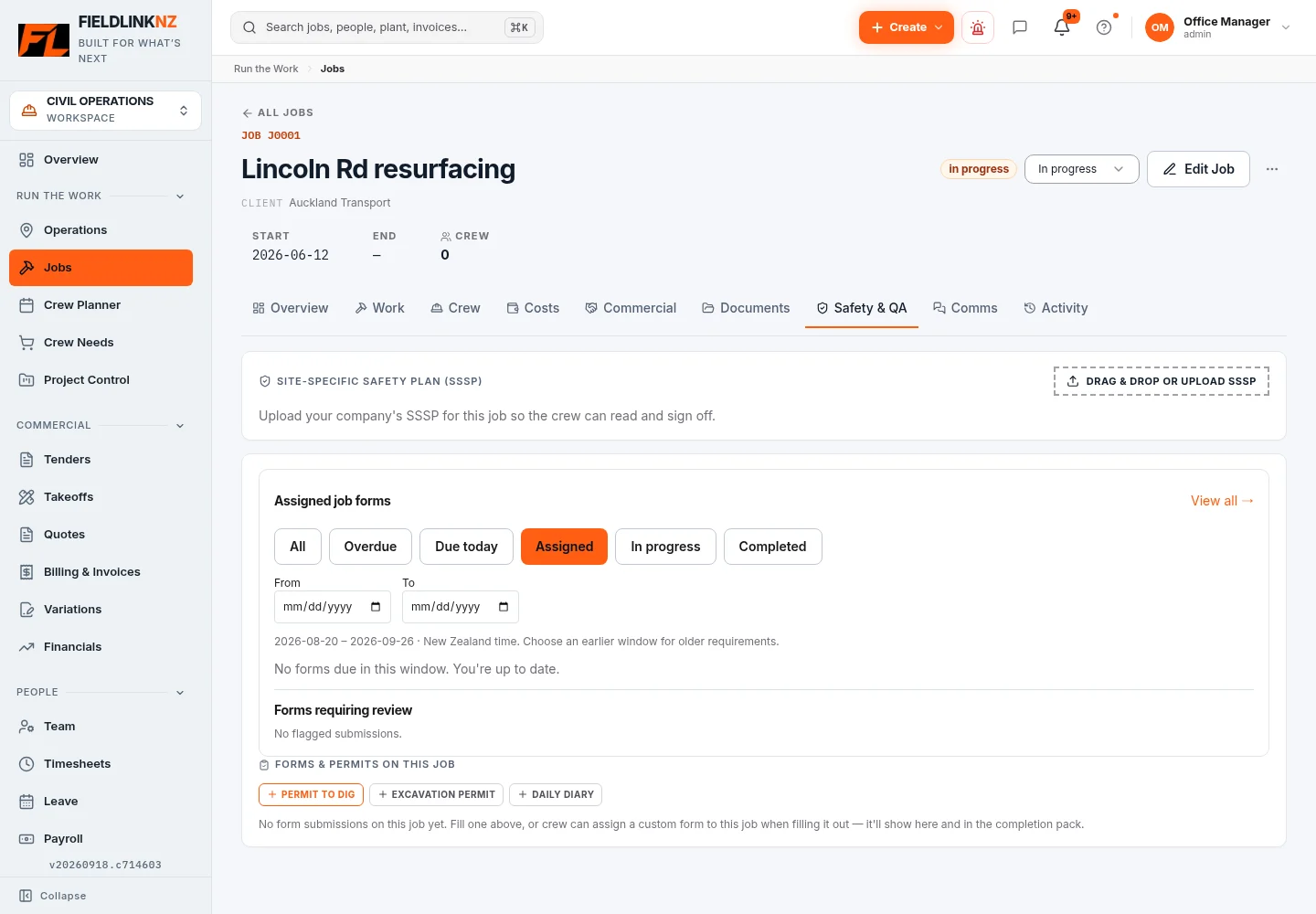
The Job Safety tab brings assigned forms into the job workspace. Fieldlink also provides SSSPs, pre-starts, hazard reporting and toolbox talks. The office can review submissions and follow up actions.
Explore the civil safety workspace and site QA records. The screenshot shows the actual empty assigned-form state in the demo job.
Commercial control
Review what went into the work.
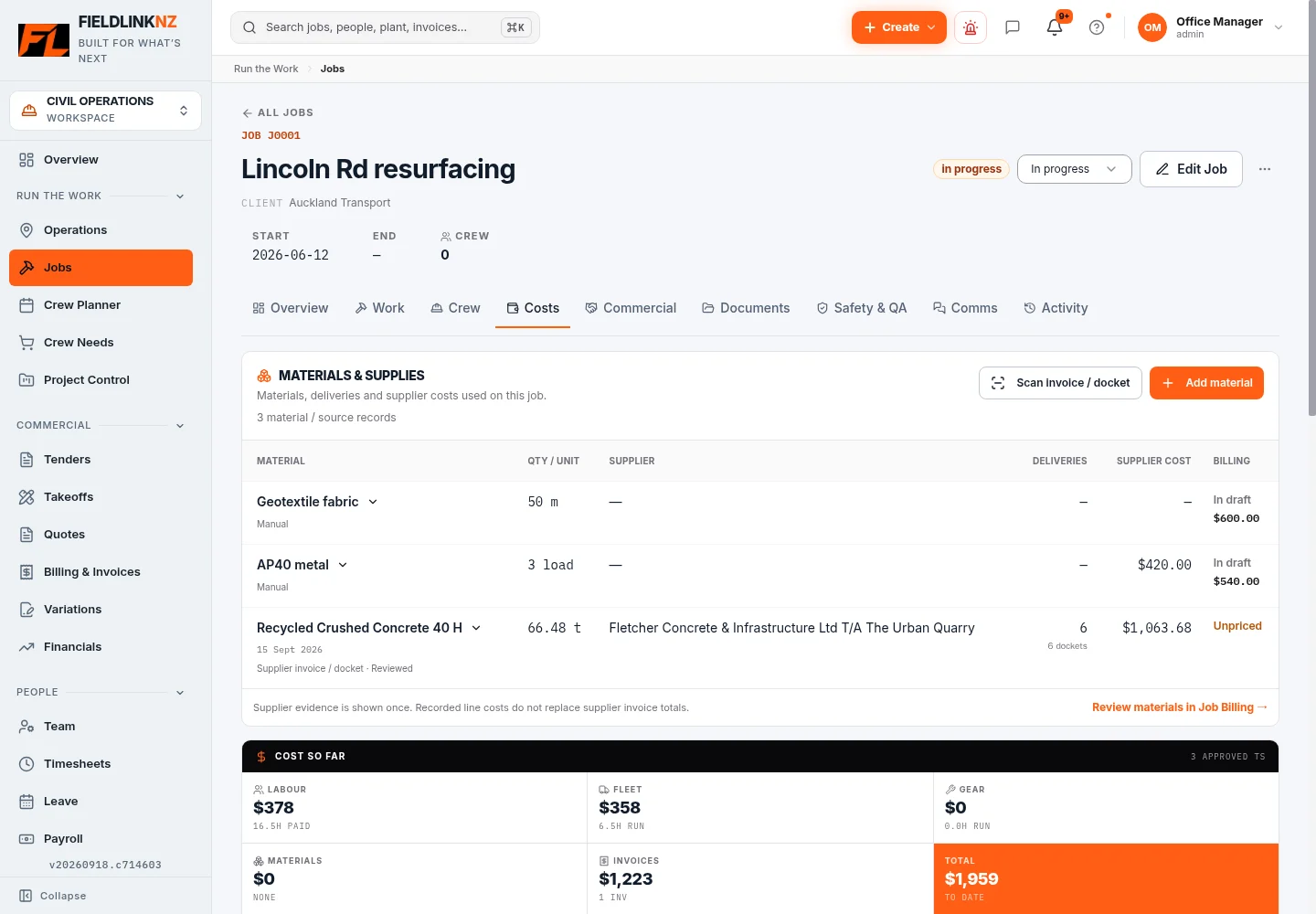
Review labour, plant, materials and supplier costs against the job. Check the underlying records and rates before relying on the totals for pricing or billing. Job costing connects those records to the commercial view.
Build the scope in civil estimating, measure quantities with construction takeoffs, then manage quotes, variations, customer invoices and progress claims as the work develops.
Xero and accounting
Connect a Xero organisation through OAuth. Fieldlink supports quote and invoice sales sync, imports Xero contacts and tracking categories, and can match or create a contact when pushing an invoice. With Xero Payroll NZ access and employee, earnings-rate and calendar mappings configured, approved hours can be sent to Xero. Leave balances can be refreshed from Xero.
Review sync results and resolve any errors in the office. See the Xero timesheet integration workflow for the accounting hand-off.
Office + field
The job on your phone.
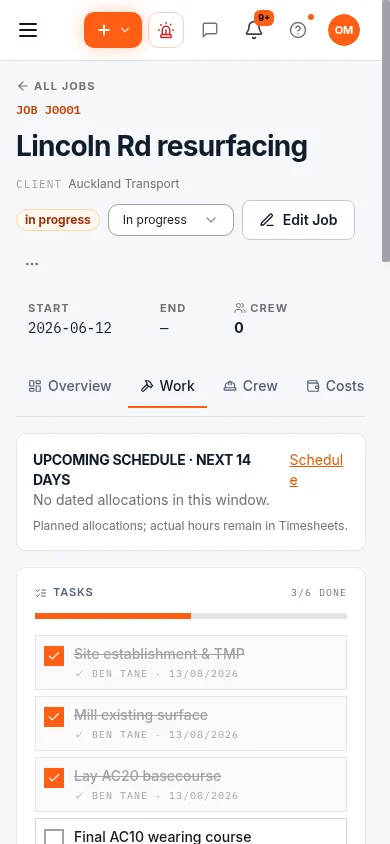
Open Fieldlink in a mobile browser or add the PWA to your home screen. The responsive Job Work view keeps the job accessible away from a desk. This image shows the office account on mobile; fieldworker screens depend on role and access.
Supported timesheets, pre-starts, safety reports and forms can queue offline. Previously loaded data can remain available. Reconnect to upload queued work and check for failed submissions; offline support does not cover every screen or action.
Choosing job management software
What should a NZ contractor look for?
- A job record that connects planning, site entries and costs, with access suited to each role.
- Mobile screens your crew can use, and a clear explanation of which actions work offline.
- Timesheet approval and an accounting hand-off that fit your existing payroll setup.
- Plant, safety and commercial workflows that match the work you actually do.
- Clear NZD pricing, crew limits, support arrangements and a way to export your records.
Compare the feature overview, current plans and crew limits and setup FAQs against those requirements.
Moving from spreadsheets
Start with one active job. Check its people, plant, rates and opening information, assign the next day's work and ask the crew to record it. Have the office review the entries against your existing records before moving more jobs across. Agree who owns approvals and how historic records will be retained.
Who Fieldlink is built for
New Zealand civil and construction teams: earthworks, drainage, roading and contractors coordinating crews and plant across jobs. Explore Fieldlink for civil construction for the wider industry workflow.
What NZ civil crews use Fieldlink for
Every job from the first quote to the final invoice, tracked in one NZ-made app — so nothing falls through the cracks and you actually know which jobs are making money.
Unique job numbers
Every new job gets an auto-generated number like J0042. Field workers write it on supplier slips at the counter — invoice extraction can identify the job reference for matching, with supplier details available for office review.
Drag-drop dispatch board
Sunday night, drag your crew onto Monday's jobs. Set the ute for each crew. The team sees it on their phone Monday morning. Done in 10 minutes.
Live margin per job
Set the quoted value on a job and Fieldlink shows a live margin % next to its spend — green when healthy, red when you're losing money. Pricing problems surface before the job finishes, not after.
SSSP drafting and review
Tell us the job type, location, hazards. AI drafts a Site-Specific Safety Plan for you to review, edit and export as a branded PDF. Check site details and content before issuing.
Fleet + plant tracking
Every digger, ute, truck and trailer tracked by rego. WOF/COF reminders, service-due alerts, run-hours, fuel. Plant hours roll into cost-per-job.
AI invoice scanner
Snap a photo of any PlaceMakers / Bunnings / fuel slip. AI extracts invoice details and looks for a job reference. The office reviews the extracted lines, job allocation and material details before using them for billing.
Pay run + Xero
Friday: hit Pay run, pick the week, approve. Fieldlink calculates hours × rate with your overtime rules, then pushes timesheets straight into Xero Payroll NZ.
QA, pre-starts & forms
Pre-start checklists, QA records, toolbox talks and hazard reports all filed from the phone and searchable in the office — audit-ready without the ring binders.
Client portal & claims
Clients approve variations online, see progress claims, and pay invoices — fewer phone calls chasing sign-off, faster cash in the door.
How a job runs through Fieldlink, start to finish
- 1. Quote it
Build the quote in Fieldlink (or import it), send it to the client from the app, and get an online acceptance. Accepted quote converts to a job in one click — quoted value carried across so margin tracking starts on day one.
- 2. Number it
The job gets its number — J0042 — and that number follows everything: timesheets, supplier slips, plant hours, photos, QA records. When a PlaceMakers invoice shows up with J0042 scrawled on it, the extracted reference helps match it to the job; the office reviews the supplier details.
- 3. Dispatch it
Drag crew onto the job on the dispatch board, assign the ute and the digger, attach the SSSP. Workers open their phone in the morning and see where they're going, what they're doing, and what the hazards are.
- 4. Work it
The crew logs hours against the job and the machines, completes pre-starts, files hazards, snaps progress photos. Online entries reach the office; supported offline entries queue until reconnection — no Friday-afternoon paper chase.
- 5. Watch the money
The job's cost breakdown builds itself: labour at real hourly rates, plant at internal charge-out rates, materials, and confirmed supplier invoices. Next to it, the live margin percentage against your quoted value.
- 6. Bill it
Import approved hours onto a customer invoice as line items (with double-billing protection), add variations the client already approved online, push to Xero, and send. Progress claims for bigger contracts work the same way.
Why NZ crews need NZ job management software
Most job management apps sold in New Zealand are Australian or American. That matters more than it sounds: pricing in AUD or USD, support in the wrong timezone, and — the big one — no idea what a SSSP is, how the Holidays Act works, or why your payroll needs Mondayisation handled correctly.
- SSSPs and site safety built in — main contractors won't let you through the gate without one. Fieldlink generates them, gets them signed on the phone, and keeps the audit trail.
- Holidays Act–aware payroll — overtime rules, public holidays and leave balances handled the NZ way, with a one-click push to Xero Payroll NZ.
- NZD flat pricing — one monthly fee for the whole crew. No per-seat charges for a labourer who only submits timesheets.
- NZ support — questions answered in your working day, not Sydney's or San Francisco's.
Fieldlink vs Simpro vs Tradify vs spreadsheets
Simpro is the default “big” option in NZ for civil and trades job management software — but it's an Australian product priced in AUD that bills per user, with a steep onboarding fee and a UX clearly designed for the bookkeeper, not the digger op on the phone. A 10-person Kiwi crew on Simpro pays roughly NZ$800–$1,200/month in subscription fees alone (indicative, as at mid-2026). The same crew on Fieldlink's Crew plan pays NZ$39.99/month flat — a saving of over NZ$9,000 a year going straight to your bottom line.
Tradify is built for one-person tradies — an electrician, a plumber. It doesn't handle multiple field workers dispatching to multiple jobs in one day, plant run-hours, or SSSPs. Fieldlink does — that's our whole point.
Spreadsheets are free until you count the office hours. Re-typing paper timesheets, chasing missing dockets, reconciling supplier invoices against jobs by memory — for most crews that's 5–10 office hours a week. At any realistic hourly rate, the spreadsheet is the most expensive job management system you can run.
Job management software FAQs
What is job management software?
Job management software is one system that tracks every job in your business from quote to final invoice — who's on it, what hours and machines went into it, what it's cost so far and what's left to bill. Instead of a whiteboard, a pile of spreadsheets and a shoebox of supplier slips, everything about a job lives in one place that both the crew and the office can see.
How much does job management software cost in NZ?
Per-user platforms like Simpro typically cost a 10-person NZ crew NZ$800–$1,200 per month once you add the modules a civil business needs. Fieldlink is priced flat in NZD — the Crew plan covers a whole team of up to 12 people for NZ$39.99/month, with every feature included and no onboarding fee.
Does Fieldlink work for civil construction and earthworks?
Yes — that's exactly who it's built for. Fieldlink handles multi-crew dispatch, plant and fleet run-hours, SSSPs and pre-starts, cartage and truck dispatch, progress claims and back-costing per job. It's made in New Zealand for NZ civil contractors, drainlayers, earthworks and roading crews.
Can my field workers use it on their phones?
Yes. Fieldlink is a PWA that installs to the home screen like a native app. Workers see their jobs for the day, clock hours against the job and machine, complete pre-starts, sign SSSPs and snap site photos — with offline queuing for supported timesheets, pre-starts, safety reports and forms. Previously loaded data remains available; queued work syncs when coverage returns. Check failed submissions after reconnecting.
Does it integrate with Xero?
Yes — invoices and quotes push straight to Xero, Xero contacts can be imported and invoice contacts matched or created, and approved timesheets (including overtime splits) can be pushed to Xero Payroll NZ each pay week. Leave balances can be pulled from Xero with the last synced balances shown in the app.
How is Fieldlink different from Simpro or Tradify?
Simpro is an Australian per-user platform aimed at large trade businesses — powerful but expensive and heavy to onboard. Tradify is built for one-person tradies and doesn't handle multi-crew dispatch. Fieldlink sits in the middle deliberately: full job management, H&S and payroll for a real crew, at a flat NZ-dollar price, with NZ-specific features like SSSPs and Holidays Act pay rules built in.
Bring your next job into Fieldlink
30 days free. NZD pricing. Built in Aotearoa.
Start free trial →